You open another chat interface, type out your prompt as according to your prompt engineering training, pasting in various bits of chat messages, and relevant documentation. Three messages later, you finally scoped your task properly and get started on the actual work. Work you’ve been doing scattered across the last twenty chatbot sessions, three different LLMs, overcomplicated call transcripts, multiple Confluence sites, and probably around two years of notes.
For me, this is a daily occurrence in work. Potential hours of knowledge gathering and context curation before we can actually get started on the work itself. We hoped, and still sell, AI agents as helpers in all of this. Instead, they’ve become part of the hump, another friction to clear before real work can begin. The promise was a collaborator that meets you where you are. The reality is yet another empty context window waiting to be filled.
The irony is that we’re not much better off than our agents. We hold context in our heads, in dog-eared browser tabs, in Slack or Teams threads we’ll never find again, in the sheer exhausting labour of remembering where we put things. The desktop was designed for single-tasking, for one person, one document, one thought at a time. Multitasking broke that contract almost immediately, and what followed was decades of patches: office suites that bundled applications together and hoped you’d stay inside them, search that never quite understood what you meant, ecosystems that traded interoperability for coherence, hyperlinks that connected documents but not understanding. We built workarounds on top of workarounds and called it productivity. Agents are simply the first collaborators honest enough to expose how much we were compensating for all along.
Inheriting the filing cabinet
The metaphor of ‘the desktop’ goes back a few decades to Xerox PARC, where the boundaries of how we interface with a computer were first drawn. The Xerox STAR introduced the WIMP paradigm —Windows, Icons, Menus, Pointer— a visual language that made the computer legible by making it familiar. Steve Jobs recognized its potential immediately, first realizing it commercially with the Apple Lisa and then, definitively, with the Macintosh.
It worked. The desktop made computing accessible by mapping its interactions, affordances, and visual logic onto a world people already understood: filing cabinets and folders, corkboard bulletin boards, a single person at a single desk, doing one thing at a time.
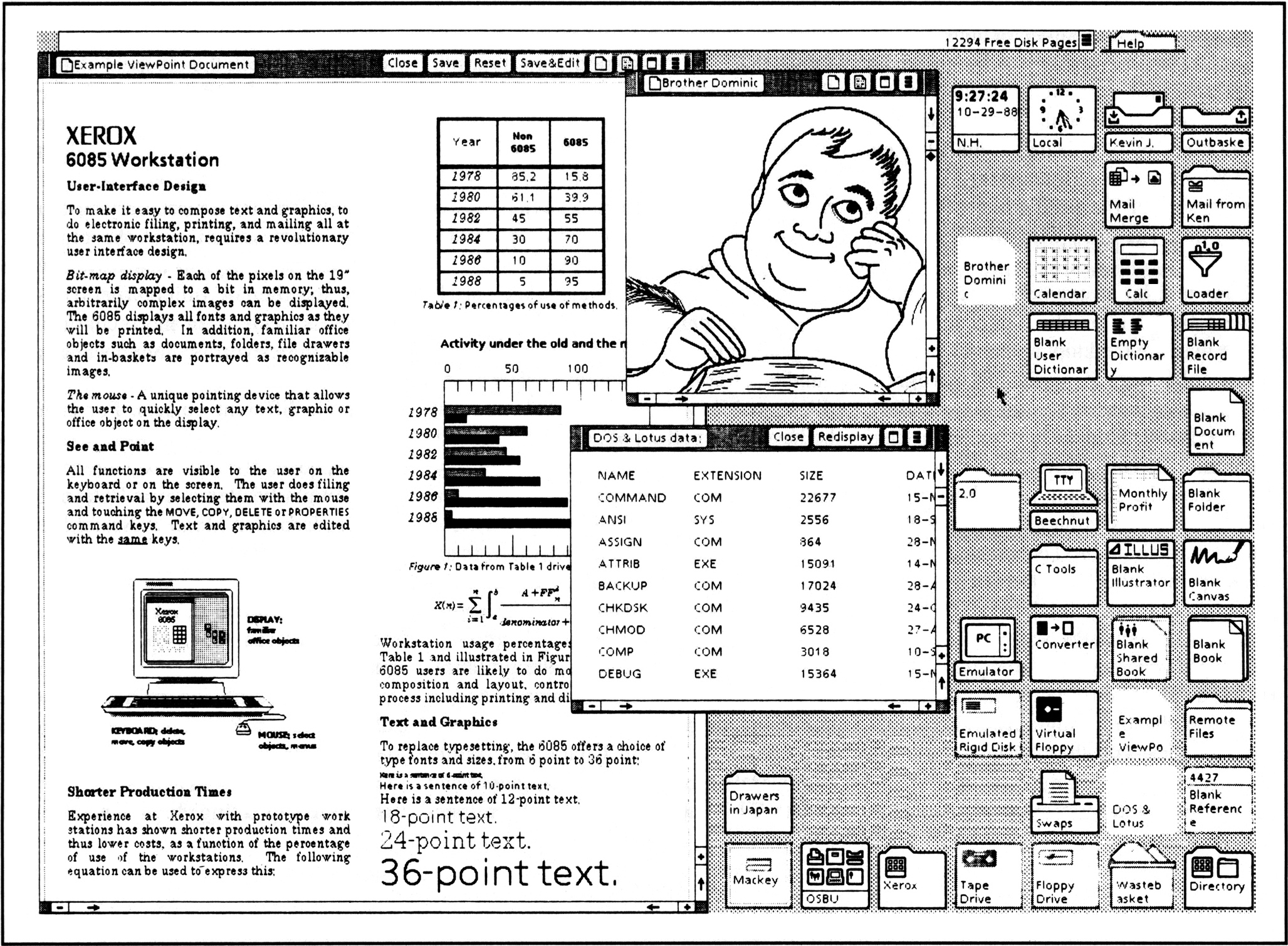
The original desktop interface of the Xerox STAR
Meanwhile, that world has changed considerably. As laid out in Don Norman’s 1996 essay, The Anti-Mac Interface, the assumptions baked into the desktop have aged poorly. Norman argued that the desktop interface was designed for an isolated user with limited digital literacy, working alone on a local machine — and that this was already becoming a fiction (even in 1996).
Networked computing made information relational rather than local. Rising digital literacy meant the training-wheel affordances of icons and folders had become constraints rather than on-ramps. And the centrality of natural language, accelerated now by the mass onslaught of chatbots and conversational AI, reveals that direct manipulation was never the most natural way to express complex intent. It was just the best available option at the time.
Still, the desktop didn’t fail, quite the opposite. It succeeded so completely that we stopped questioning it. We inherited its assumptions: siloed applications, manual file organization, no persistent memory between sessions, and called it computing. What agents are now exposing is that those assumptions were always a compromise, ones we forgot we made.
Strangers in a foreign interface
The desktop didn’t stop evolving after 1984. The taskbar gave us a way to juggle multiple applications without losing them entirely. Exposé and virtual desktops tried to tame the sprawl. Mobile computing reinvented the interface almost completely, stripping it back to single-purpose apps, touch, and the assumption that you’re doing one thing at a time on a small screen. Elegant for consumption, hostile to complex work. Each evolution addressed the symptoms without touching the underlying architecture. We were still filing, still switching, still manually carrying context from one place to the next.
Some experiments got closer. Smart Folders on macOS tried to make organisation semantic rather than spatial. Microsoft’s PowerToys gave power users back some control over how windows behave and how the desktop actually works. But these remained edge cases, opt-in tools for the patient minority. The mainstream desktop in 2026 is still, structurally, a collection of walled gardens. Applications that don’t talk to each other, files that don’t know what they’re related to, and a user expected to hold the connective tissue in their head.
This is the environment agents are being asked to work in.
More actionable agents like Anthropic’s Claude Computer Use and OpenAI’s Operator navigate this environment the only way they can: by looking at it. Screenshots as surrogate understanding, simulated mouse clicks as action. It works technically, but it’s absurd. An agent that has to read your interface the way a stranger reads a menu in a foreign language, inferring structure from visual appearance because no deeper access layer exists.
Agentic browsers like Dia and Perplexity’s Comet reimagine the browser as a task environment rather than a document viewer. They’re not incorrect, specialized programs and workflows live in the browser most of the time. The advantage of these browsers are that maintain session context, surface relevant information across tabs, and try to understand what you’re doing rather than just where you are. But they’re still browsers. Close the tabs, or leave the browser and the context evaporates.
Desktop agents like Microsoft Copilot, Apple Intelligence, and the newer Claude Cowork have the most ambitious brief: so called system-wide awareness, action across applications, a persistent layer of intelligence over everything you do. The reality is more modest. Even inside a single ecosystem, Microsoft or Apple’s walled garden, the seams are visible. Copilot knows your Word document but loses the thread when you switch to Teams. Apple Intelligence understands your messages until it doesn’t.
Cowork is the newest and arguably the most architecturally self-aware of the three, born directly from seeing users force a coding tool to do their filing, their research, their slide decks, because nothing else had real access to their machine. With Cowork, you give an agent a folder, describe an outcome, step away, and it works. Ultimately it has no thread connecting what you did yesterday to what you’re doing now, other than leaving yet another paper trail. The persistence it offers is your file system, which you already had.
A different, more structural answer to reaching outside of the walled gardens of our tools is middleware called MCP (Model Context Protocol). This is software that sits between AI models and applications, translating between systems that were never designed to communicate. Right now, it the best available solution to build out the metaphorical sandbox of your agent. It solves the problem of gathering context and information for your work, but not that you have to do it every single time. The fact that brokering basic communication between your calendar and your documents requires a dedicated infrastructure layer tells you exactly how deep the problem runs.
Every one of these approaches is fighting the same wall. Context doesn’t persist. Nothing knows what just happened. Each agent starts from zero, every time, because the environment keeps no memory of its own.
A missing layer
At some point in every complex piece of work, you become the database. You are the one who knows that the decision from last Thursday’s meeting connects to the constraint in a six-month old email, which explains why the Figma file looks the way it does. We have a name for the practice of externalising that connective tissue: documentation. We also know, collectively and honestly, that it never quite keeps up. Operational intelligence, the capacity to understand not just what happened but what it meant and how it connects, is a layer that simply does not exist in our computing environments. We built extraordinary tools for storing, retrieving, even for documenting itself. We never built the layer that understands.
Agents have begun to gesture at this layer, with most now carrying some form of memory in form of records of past conversations. Memory of conversations however is not the same as continuity of intent. The agents knows or can look up what you said but has no model of what you were trying to build, how that conversation connects to the last two, or how it connects to the broader scope of work you’re doing.
There have been attempts at bridging this gap. Microsoft Recall, launched as part of a Windows 11 update, periodically screenshotted your screen to build a searchable record of everything you’d done and seen across sessions. We’ve outgrown the one-task, one-tool mode of working, and something like Recall could, in principle, stitch those fragments into genuine operational continuity. The feature never fully landed, as Microsoft had long since spent whatever trust would have been needed to make that feel safe rather than even more surveillance. But the attempt matters. It was a mainstream acknowledgment that the gap between what your computer shows and what you’re actually doing is a problem worth solving at the OS level.
What this actually requires isn’t smarter agents or throw more ‘AI’ at it, but more open systems. Information that isn’t trapped inside applications, that can move and connect and mean something outside of the walled garden it was created and kept in. Information, both operational and the work itself, that can flow freely between our different tools, rather than being bottlenecked by the person sitting behind the keyboard, or a chatbot with an arsenal of MCP tools juggling thirty-something balls in digital space.
Even now, frontier agents are spending most of their energy on the wrong problem. In principle they can bridge the cross-application gap through workarounds like Computer Use or purpose-built middleware, but these are tools navigating interfaces that were never built for them, actively building bridges between systems that were never designed to talk to each other, compensating for an environment that actively resists them. The closer an agent mimics human interaction, clicking through GUIs, reading screens, filling forms, the more dependent it becomes on the same interfaces that have handicapped us as humans.
The systems and tools we actually need are ones that conform to our way of working, not the applications’. Systems that provide tools and information that is open, portable, and semantically connected. And when you drive that to its zenith, and build that environment well enough, you mostly don’t need the agent for the parts that currently feel hardest. The friction that agents exist to paper over disappears. What remains is execution at scale, the genuinely complex, parallel, time-consuming work that benefits from automation regardless of how good the environment is. The agent gets out of the way not because it failed, but because the infrastructure finally caught up. We stopped needing a translator the moment both sides learned to speak the same language.
Building a garden of our own
The idea of information that knows its own relationships is not new. In the 1960s, a computer scientist, or in his own words, “a nerd bearing gifts” named Ted Nelson proposed transclusion: content that could exist in multiple contexts simultaneously, carrying its origin with it. No copied information, but references to the origin or place of creation of an idea. Information that remembered where it came from, what it was responding to, what it was built on.
It never got traction in the environments where we actually work. Attempts at implementation, Xanadu chief among them, leave a complicated, messy legacy. Digital information went a different direction instead: discrete, isolated, stripped of its relationships the moment it was saved somewhere.
HyperCard arrived in 1987 as something close to a proof of concept. A tool that let ordinary people build webs of linked, relational information easily, which was groundbreaking at the time. Stacks of cards that knew their connections, information that flowed between contexts rather than sitting in folders or tools waiting to be retrieved. It wasn’t transclusion in Nelson’s full sense, but it was the same instinct: that information is more useful when it exists in relationship than when it exists in isolation. People took to it immediately, but HyperCard faded with time as our tools and desktop evolved.
That instinct however never went away. Today, Notion and Obsidian are champions of knowledge management, and they are very popular. These don’t introduce new behaviour, they just emphasize bidirectional linking. Given tools that made relational, interconnected thinking easy, people abandoned hierarchical folder structures without much convincing. The appetite never left, the filing cabinets did though.
These tools paired with modern language models, already gives us a glimpse of what relational knowledge actually unlocks in practice. An agent with access to a well-maintained vault isn’t just searching text, it’s traversing a graph of connected thought. It knows that this note responds to that one, that this decision was made in the context of that constraint, that this idea has been circling for six months across a dozen different entries. The quality of what it can do scales directly with the quality of the relationships in the knowledge it has access to.
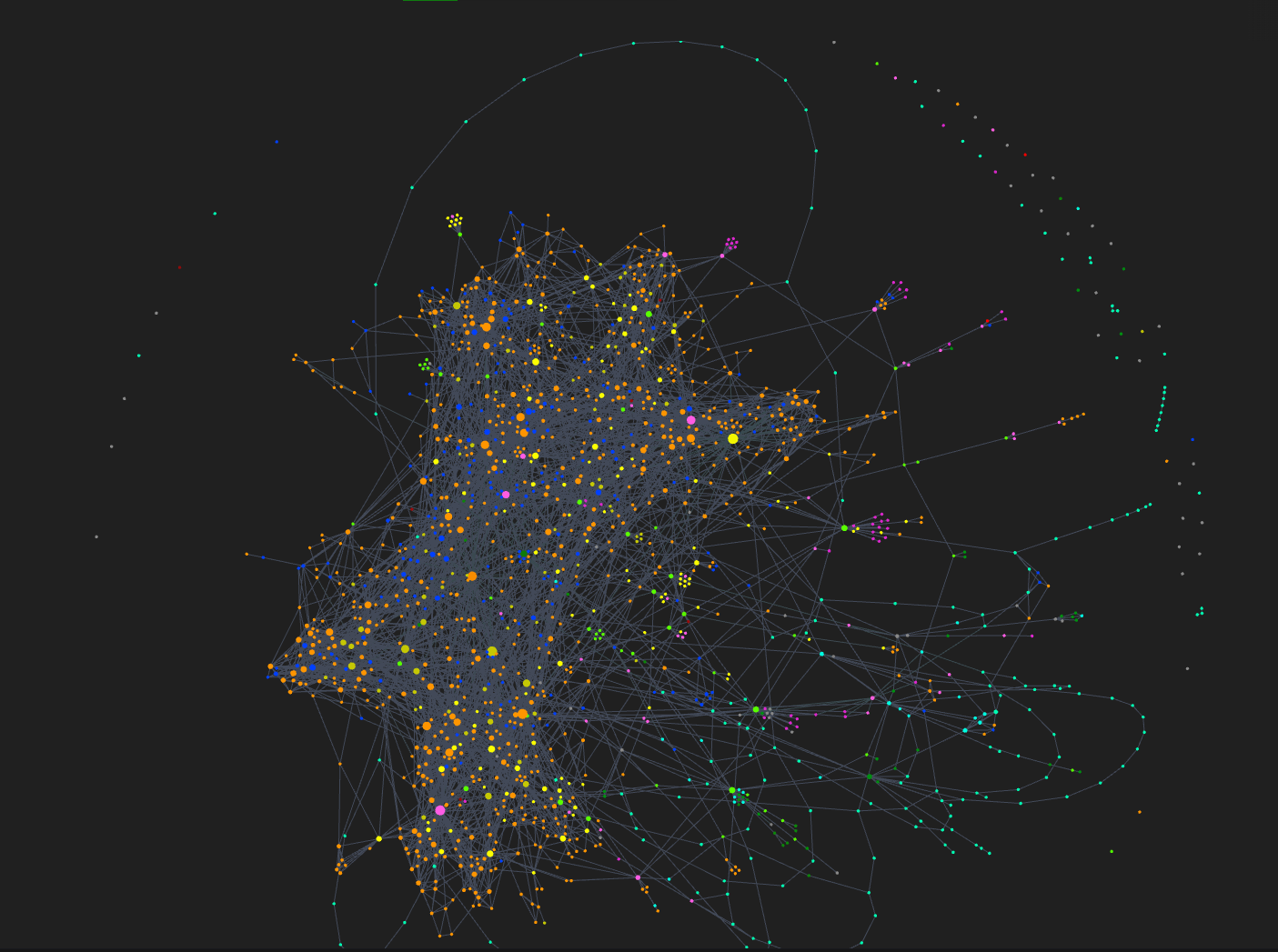
An Obsidian knowledge graph, each dot being a note
Expand that beyond a single application, beyond just text, and the picture changes considerably. Semantic representations of images, flowcharts and diagrams, conversations, design files, spreadsheets, all connected not by folder structure but by meaning and relationship, and you’ve built something that stops feeling like a productivity tool and starts feeling like an extension of how you actually think. Vision models can pull visual context into the same graph. Cross-modal connections that you would previously have had to build and maintain manually start forming on their own. The information finds its relationships rather than waiting for you to declare them.
Add on top of that genuine cross-session context, a system that understands not just what files exist but what work is actually in progress, what threads are live, what decisions are pending, and something shifts… The amount of interfaces start to decrease drastically. They don’t disappear completely, and the idea that they might is probably the wrong ambition. But they finally get to become what they were always supposed to be: responsive to the work rather than dictating its shape. A workspace that knows what you’re doing doesn’t need you to navigate it the same way. The friction that currently lives in the gap between your intent and your environment starts to close.
Renegotiating the interface
This brings us to the most radical, and potentially uncomfortable question in this whole piece. If the problem is the screen, the application, the interface as the unit of computing — if the real issue is that we’ve been organising information around the containers rather than the meaning — then the most radical response is not ‘better software’. It’s asking whether the screen was ever the right place to put any of this.
Bret Victor’s Dynamicland is a research environment built on exactly that provocation. Computing that is physical and spatial, where the environment itself holds context rather than the application, where information is shared and present rather than siloed behind a personal screen. What does that translate to in reality? No screens in sight, but people sitting around a table crafting and drawing things with pen and paper, the computation happening in the room itself and not an interface you navigate but as an environment you inhabit. It is a question about absolute first principles of computing. What does a computing environment look like when it’s (re)designed around how humans actually share and build knowledge together, rather than around the individual at a desk with a filing cabinet back in the 80s?
It sits at one end of a spectrum. At the other end is something more immediately recognisable: the desktop, finally reimagined. Still a screen, still personal, but adaptive in the way it was always supposed to be. A workspace that knows what you’re working on. That surfaces what’s relevant without being asked. That reconfigures itself around the task rather than waiting for you to do it manually. The one desk, one task vision of 1984, but the desk is now intelligent, the task is now understood, and the filing cabinet is finally, mercifully, optional. This future is closer, with parts of it are already visible in the tools being built today.
These aren’t competing visions. They’re the same question asked at different levels of radicalism. Both require the same thing underneath: open systems, relational information, context that persists and means something. The difference is just how far back you’re willing to go on the first principles. One asks us to reimagine the interface. The other asks us to reconsider whether the interface was ever the right unit of computing at all.
The desktop was a deal struck in 1984 under constraints that no longer exist, and we’ve been renewing it automatically ever since without reading the terms. It is time to tear up that contract.
The alternative isn’t about slapping a faster, smarter chatbot onto the same old filing cabinets, nor is it about building more middleware to duct-tape our walled applications together. It is about shifting our underlying metaphor entirely. We need to move from the sterile, isolated architecture of the corporate office to the living, interconnected ecosystem of a garden.
Imagine a personal digital garden—a workspace where your information isn’t locked in discrete boxes, but planted in rich, relational soil with a dense network of roots. In this environment, an agent isn’t a clumsy intern trying to read your screen like a tourist reading a map; it is a co-gardener. Because the system natively understands the relationships between a design file, a meeting note, and a calendar deadline, the friction of “gathering context” evaporates.
When you boot up, you aren’t faced with an empty context window or a scatter of forgotten browser tabs. You simply sit down and observe the landscape of your ongoing work. You see what is blooming and what needs attention. You spend your time doing the actual work: watering an emerging idea, pruning a sprawling research thread into a cohesive document, or cross-pollinating concepts from different projects. The agent works alongside you, not by hijacking your mouse, but by nurturing the connections you’ve planted and keeping the underlying ecosystem healthy.
Deloitte Digital Belgium is thinking about the future of work and the tools that shape it. We don’t need AI that can brilliantly navigate our broken, siloed desktops. Instead need to build digital environments that are alive and connected enough that cultivating the work is the only thing left to do.

Pim Tournaye
Creative Technologist / UX Designer